


Super Simple Shopping List
3.6612.00 Reviews
App Specs
- Version
- 4.0.2(25058)
- Updated On
- License
- Free
- Downloads
- 1,000,000+
- Developer
- Maple Media
- Categories
- Shopping
- Platform
- Android
Screenshots

 Analysis by AppCompare
I judge a shopping-list app by what happens when I’m in a hurry: can I add an item before I forget it, then find it without fumbling around in the shop? Super Simple Shopping List aims for that practical kind of ease. Its appeal is not a sprawling set of meal-planning tools, but a direct way to keep track of groceries and errands. I think it makes the most sense for people who want a clear list and don’t need their shopping routine turned into a project.
A useful list starts before you reach the store
The most helpful way to use a basic list app is to treat it as a shared household habit, not something you rebuild from scratch at the supermarket. When someone notices the last of the coffee is gone, adding it straight away is more reliable than trying to remember it later. A short entry such as “coffee” or “tomatoes” is enough for ordinary shopping; adding a familiar brand or size only when it matters can keep the list readable.
I’d also use separate lists for distinct errands if I tend to combine a grocery run with a stop at a pharmacy or another shop. That small bit of planning makes a simple list more useful without needing a complicated system. The trade-off is that the app is best suited to clear, everyday reminders. If you want recipes to generate ingredient lists, automatic pantry tracking, or detailed budgeting, you may prefer a dedicated meal-planning or household-management app.
Where a lightweight approach helps—and where it doesn’t
Maple Media’s shopping app is free to download, and its straightforward purpose is easy to understand. It has an Everyone age rating, a 3.5 average from around 12,000 ratings, and more than a million installs. Those figures suggest it has found an audience, but they don’t tell me whether its particular workflow will suit you; that depends on how much organization you expect from a list.
For a quick weekly shop, the strongest case is convenience: make a list at home, check it as you go, and avoid relying on memory for small essentials. For someone who buys the same staples repeatedly, keeping a familiar list can make preparation feel less scattered. I would still review it before leaving, especially if several people add items, because a shared list is only helpful when its entries are clear and current.
When another kind of shopping tool is a better fit
Compared with a notes app, a dedicated shopping list can keep the task focused instead of mixing groceries into meeting notes, reminders, or other scraps of information. Compared with feature-heavy grocery platforms, a simple list avoids asking you to organize every part of a shop. Neither approach is automatically better: a notes app may be enough if you already use one consistently, while a richer service may suit you if you need price tracking, recipes, or a broader household plan.
The main limitation of simplicity is that it leaves more of the organizing work to you. You need to decide what to buy, make the wording understandable to whoever is shopping, and keep the list tidy enough to use. That is a fair exchange if you want a quick checklist; it can feel restrictive if you expect the app to suggest what is missing or manage a complex routine for you.
Worth Reading Before You Choose

EA SPORTS FC Mobile 26 Is a Bigger Football Game, but It Takes Time

Flipboard Shows What News Apps Must Do Beyond the Feed

Switching to Android Auto Means Rethinking Your Driving Routine

Google Calendar Makes a Crowded Week Easier to Manage

Ludo King Makes the Most of the Minutes Between Plans

Baby Panda World Brings Quick Play to Modern Phones, but Its Game Library Feels Busy
A Minimalist's Dream
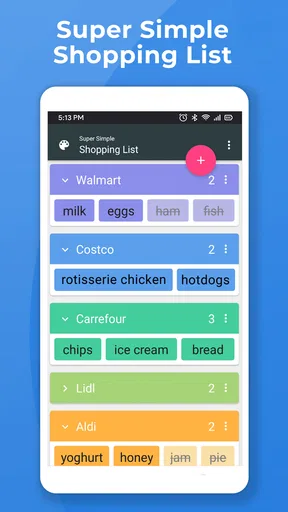
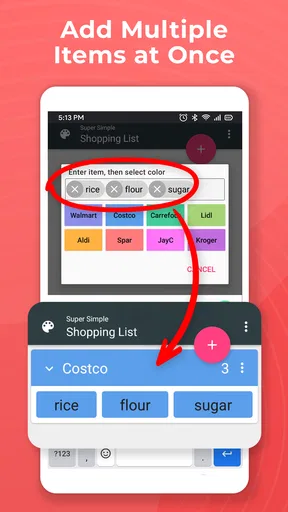
First off, Super Simple Shopping List is all about keeping things straightforward. You open the app, and bam—there’s your list. Adding items is a breeze; just tap the plus sign, type your item, and you’re good to go. The interface is as simple as it gets, with no unnecessary clutter. It’s perfect for those who value efficiency over fancy features.
Color-Coded Organization
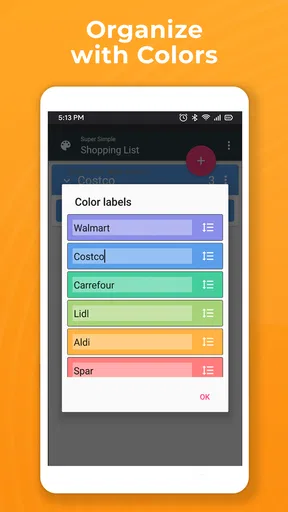
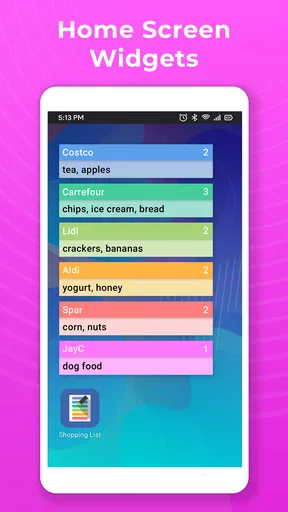
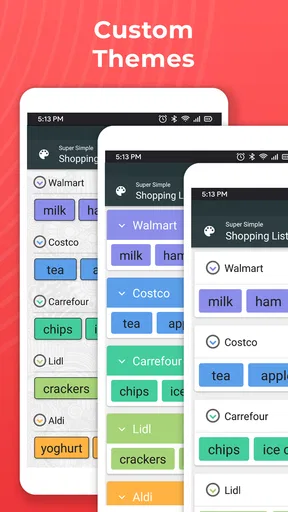
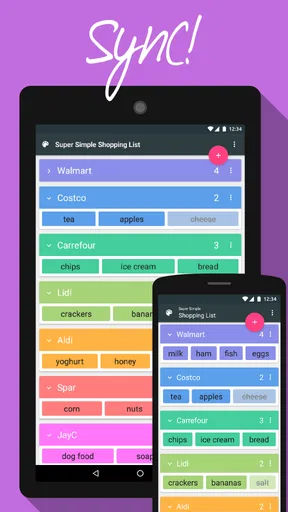
One of the coolest features, in my opinion, is the color-coding option. You can assign different colors to items, which is super handy if you’re organizing a list by categories like dairy, produce, or snacks. It’s visually appealing and makes it easier to find what you need at a glance. Plus, it adds a splash of fun to what could otherwise be a mundane task.
There’s a practical way to make that color system do more than decorate the screen: settle on a consistent meaning for each color and use it the same way each time. For example, a household could reserve one color for fresh food and another for pantry staples. That makes a glance more informative, especially when a list gets long, but only if everyone who contributes follows the same convention. If colors are assigned casually, they can become visual noise rather than useful organization.
Sharing Is Caring
Got a roommate or partner who’s always forgetting to pick up the milk? No worries! With the sharing feature, you can easily send your list to someone else. This is a game-changer for families or housemates who need to coordinate shopping trips. No more excuses for forgetting items!
In practice, sharing works best when the person adding an item includes enough detail for the shopper to recognize it. “Bread” may be fine when there is only one usual choice; “bread for sandwiches” is clearer when the household buys several kinds. Before someone leaves, I’d scan the list together and resolve ambiguous entries rather than assume both people mean the same thing. That quick check is particularly useful when one person is shopping for several people or making an unfamiliar trip.
Offline Access
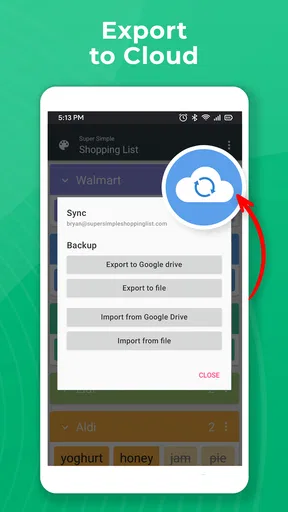
Another thing I love about this app is that it doesn’t rely on an internet connection. Whether you’re shopping in a basement grocery store or simply don’t want to use data, your list is always accessible. It’s a small detail, but it makes a big difference when you’re out and about.
That makes the app well suited to a routine where the list is prepared at home and consulted in the aisle, even if the shop has patchy reception. I would avoid making last-minute changes dependent on connectivity while already shopping; the safer habit is to add known needs before setting off and make sure the list is ready to view. Offline access helps with the act of checking a list, but it does not remove the need to coordinate clearly with anyone else who is contributing.
Keeping It Simple
While some might argue that Super Simple Shopping List lacks advanced features, I’d say that’s precisely its charm. It doesn’t bombard you with ads, and there are no confusing settings or menus. It does exactly what it’s supposed to do—help you keep track of what you need to buy, without any fuss.
That focused design also gives me a useful test for whether the app is right for someone: if your current problem is forgetting a few items, a plain checklist can solve it without a setup ritual. If the problem is coordinating recipes, tracking spending, or planning several meals in detail, a basic list will not do that work for you. I would not choose an app like this expecting it to replace those systems; I’d choose it to make the shopping reminder itself easier to handle.
Customization Options
Despite its simplicity, the app does offer some customization. You can adjust the font size and choose from a few different themes, which means you can tailor the app to your preferences. It’s not loaded with options, but it’s enough to make the app feel personal.
Font size is more than a cosmetic choice when you are checking a list while moving through a busy store. I’d set it for comfortable reading before a trip rather than wait until I’m trying to scan small text one-handed. Themes can make the screen feel more familiar, but I would prioritize legibility over appearance. These modest options suit someone who wants a little control without spending time configuring a full inventory system.
Who I’d recommend it to
I’d recommend it to solo shoppers, couples, and housemates who mainly need a shared reminder of what to pick up. It is especially sensible for someone who finds elaborate grocery apps distracting or who already knows what they intend to buy. A parent preparing a quick list before a routine shop, or a roommate adding a missing household staple during the week, can get value from a simple workflow without planning every meal inside the app.
I’d steer away from it if your shopping depends on comparing prices, coordinating recipes, tracking nutrition, or maintaining a detailed pantry inventory. Those needs call for tools built around those jobs, and trying to force them into a basic list may create more manual work than it saves. The same goes for anyone who wants extensive automation: this app is most convincing when you are happy to make the decisions and only need a place to capture them.
Practical details before you install
The app is free, with in-app purchases offered at prices ranging from $0.99 to $9.99 per item. Its current version is 4.0.2(25058), and it requires Android 6.0 or later. It was released on December 18, 2014, and Maple Media is the developer. I’d check that your device meets the minimum system requirement before downloading, and consider whether any optional purchase is relevant to your needs rather than assuming you need to pay to make a basic list.
One question people often have is whether they need internet in the store: the list remains accessible offline, which is reassuring for poor-signal locations. Another is whether the app can coordinate a household: sharing is available, but the group still benefits from agreeing on clear item names and color meanings. And if you are wondering whether it can plan meals or handle budgets, I would not treat it as a substitute for tools designed around those more involved jobs.
Final verdict
All in all, Super Simple Shopping List is a fantastic tool for anyone looking to streamline their grocery shopping experience. It strips away the complexity and focuses on the essentials, making it a perfect choice for minimalists and busy bees alike. If you’re tired of cumbersome lists and want something that just works, give this app a shot. It might just become your new shopping companion.
My recommendation comes with one condition: keep expectations aligned with the app’s deliberately narrow role. Use it for capturing items, sharing a practical checklist, and staying on course during an ordinary shop. If that is the friction you want to remove, its focused approach is a real strength. If you need a broader system to decide what to buy and manage the rest of the household routine, choose a more specialized alternative instead.
Pros
- Easy-to-use interface for quick list creation.
- Color-coding helps organize items efficiently.
- Lightweight app with minimal storage usage.
- Supports voice input for hands-free operation.
- No sign-up required
- ensuring privacy.
Cons
- Lacks advanced features like price tracking.
- No integration with other shopping apps.
- Limited to text and color; no images.
- No collaborative list sharing options.
- Ads can be intrusive during use.
FAQs for Super Simple Shopping List
What is Super Simple Shopping List and how does it work?
Super Simple Shopping List is a straightforward, easy-to-use app designed to help users create and manage their shopping lists efficiently. The app allows you to add items quickly by typing or speaking them into your device. You can organize items by category, ensuring a smooth shopping experience. Its simplicity makes it ideal for anyone looking to streamline their shopping process without unnecessary features.
Is Super Simple Shopping List available on both Android and iOS?
Yes, Super Simple Shopping List is available for download on both Android and iOS platforms. Users can find the app on Google Play Store and Apple App Store, ensuring compatibility with a wide range of devices. This cross-platform availability makes it convenient for users who may switch between different devices.
Does Super Simple Shopping List have any cost or in-app purchases?
Super Simple Shopping List is free to download and use. However, it may offer optional in-app purchases for additional features or to remove ads, enhancing the user experience. These purchases are entirely optional, allowing users to enjoy the basic functionality of the app without any cost.
How user-friendly is Super Simple Shopping List for new users?
The app is designed with simplicity in mind, making it highly user-friendly. Its interface is intuitive, allowing new users to quickly understand how to add, edit, and organize their shopping lists. The lack of complicated features ensures that anyone can start using the app immediately without a learning curve.
Can I share my shopping list with others using Super Simple Shopping List?
Yes, Super Simple Shopping List allows users to share their lists with others via email, text, or other messaging apps. This feature is particularly useful for families or roommates who need to coordinate shopping tasks. Sharing is straightforward, making collaboration easy and efficient.


